Note Block Display |
by xaero

|
||
|
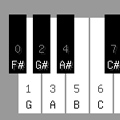
descriptionAdds a GUI to note blocks to aid in choosing a particular note without having to cycle through all of them. features
|
 Minecraft Forum |
|
supported minecraft versions1.12.1 1.12
1.8
1.7.10
1.7.2
1.6.4
1.6.2
1.12
1.8
1.7.10
1.7.2
1.6.4
1.6.2
|
|||
screenshotsNo screenshots available videos |
|||
related mods
LibShapeDrawby xaero |
|

|
LibShapeDraw is an open-source API mod that provides a set of flexible and powerful drawing and animation tools for other Minecraft client mods to use.LibShapeDraw is an open-source API mod that provides a set of flexible and powerful drawing and animation tools for other Minecraft client mods to use.
|
World Downloaderby Pokechu22 and julialy |
|

|
World Downloader, abbreviated WDL, is a mod that allows saving of a world on a remote server for singleplayer use. Mainly, this means that it can be used to backup your creations on a server. This is a continuation of the older version by cubic72 and nairol.World Downloader, abbreviated WDL, is a mod that allows saving of a world on a remote server for singleplayer use. Mainly, this means that it can be used to backup your creations on a server. This is a continuation of the older version by cubic72 and nairol.
|
Spawn Detectorby digitalshadowhawk |
|
|
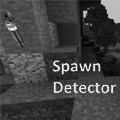
This is a liteloader mod for minecraft 1.9, 1.9.4 and 1.10.x based on a feature in Not Enough Items. It is designed to show a yellow "X" over blocks where the light level will allow mobs to spawn during the day (ie. above ground in the overworld) and a red "X" over blocks where mobs can spawn at any time.This is a liteloader mod for minecraft 1.9, 1.9.4 and 1.10.x based on a feature in Not Enough Items. It is designed to show a yellow "X" over blocks where the light level will allow mobs to spawn during the day (ie. above ground in the overworld) and a red "X" over blocks where mobs can spawn at any time.
|
I got nothing






